Showing posts with label project life. Show all posts

Sunday, February 5, 2017

Weekly Layout Share | Week 5

Happy Sunday! Here are some layouts I made although some layouts I already posted for the new release, I have some here for the Sweetshoppe Bingo challenge. What challengws are you in? from The Lilypad? From The Digital Press? Anywhere is good and fun right?


February Bingo #20 - What Brings You Joy?


February Bingo #6 - Scrap a Celebration


Also, here's my PL Week 4. Super busy this week. Maybe I'll have 4 pages for my week 5. I'm actually trying to keep everything simple but of course I'm open to the posibilities that 4 pages or 6 pages might happen :)


So by the way, Ginger of Dandelion Dust Designs asked me to become a permanent CT for her. I was like WOW! Really? I got a slot on your team? Oh. Em. Gee... I was so excited to received the email and I'm very thankful for Ginger for the opportunity. So yup, you'll see me doing more layouts for her :) Happy Scrapping!
 photo dec2014siggy_zpsf33d567c.png
SaveSave

Friday, January 27, 2017

DDD New Release and PL Update and a News

Hey all! It's Friday and it's New Release Day. Here are some of Dandelion Dust Design's new release at Gingerscraps.


It's available exclusively ate gingerscraps and is 33% off now.


I made a few PL pages using the app but I also add a card of my own to include the qr code I have. Weeks 2 and 3 here. I haven't finished my 2016 yet, I'm still making some adjustments and retouches on my pages. Hopefully would be able to finish them and send them to the press to be booked. I'm egzoiteeed!


I also have a news for you. I'll be CT-ying for Pixelily Designs this year. Have you seen her kits and templates? They're all gorgeous! I'm so grateful that she chose me as one of her new CT team this year :) Visit her store and her Facebook page. I'll see you again later this week. Happy scrapping!


 photo dec2014siggy_zpsf33d567c.png

Tuesday, November 22, 2016

Sales and Catching Up With PL


I have been on the look out for sales this week while catching up with my project life. Here are some of what I've been checking, so far I'm loving all these sales!


Radlab is having a sale of 50% for all their  products guys. This is until Friday midnight only, so if you have any plans of buying some plugins, here's your (our) chance! All you have to do is enter HOLIDAY2016 on check out and you'll have your 50% discount calculated!


Cathy Zielske is having a 40% sale on her Designer Digitals products until Friday, so hurry up and visit her store!!


It's that time of the year again! I love this sale (and freebie) from Persnickety and I'm totally digging this since I have a wall here beside my computer table ready for some Year in Review prints. This is a US Free Shipping until December 24th.


And also, Becky Higgins will have a print sale on Cyber Monday so if you want to know it first hand, subscribe via email for more details. I've been catching up on my project life but I'm not really sure if I will have them printed by 8x8 or 10x10, I have few books here that were printed 8x8 and I feel that they're a bit small so I still need to weigh them. Anyway, here are some layouts I finished on the app and I just need to type in my week in review in photoshop and of course, add a few small clusters here and there.


Happy holidays and happy scrapping everyone!

 photo dec2014siggy_zpsf33d567c.png
SaveSave

Tuesday, October 11, 2016

December Daily 2016 Unboxing

Hey all!

So, you may have already read some posts and videos of their unboxing their December Daily 2016 kits.

Well, I received my own box last week but it took me this long to make a post because I was drroling all over it! Lol! Well this will be my first December to order a physical kit from Ali for my December Daily and I must say that I really liked my Paislee Press kit. Although I was thinking that I should have also bought Ali's main kit, I don't want to overwhelm myself with so much stuff since I just moved here in the US and I may not have the right yet to hoead (?) *insert evil emoticon smilling*
Yup. I don't have a shelf yet to put my stash and other books on. But I have the energy to make my DD for this year.

So here are a couple of pictures I took:


Even the box is usable in terms that you can use it as card/s.


And the inside!


I love the washi although I'm a little sad that they're not in roll, so I ordered on amazon some
washi tapes that kind of compliments the original. And oh too bad I forgot to but an ink pad so I bought one from amazon too (thank you amazon! :)  )


The alpha looks like a vinyl or wood and it's nice.


Right now I'm preparing my Day in the Life templates and my 30 Days of Thankful templates that I bought at Designer Digitals in September.  Kinda too much? Well this is my first time to be able to print my photobooks at ---- yeah I'm still checking on that. Because back in my country, I only have a very few choices to choose from. So I'd like to try my options here. I'm going to update you with the details but don't forget about the Day in the Life on October 27, Thursday. I'm actually thinking of using a smashbook but I'm still weighing because I bought a template from Ali and I'm still doing pl on the app, I will like it if I could have a very interesting and eventful Thursday, of course hoping for a very good Thursday :)


 photo dec2014siggy_zpsf33d567c.png
SaveSave

Monday, October 3, 2016

December Daily 2016

Hi all! I know, I've been MIA for six months. Can you imagine that? SIX MONTHS. Ugh! Who does that? Obviously me huh. Yeah, with the house move and then a couple of months later a continent, seriously, I was busy to the core. And now I lost my external hard drive. Yeah, my beloved external had drive with TONS of pictures and scrapbook kits, I was so down. I lost my ehd in August and I just realized it in early September. So I've been contacting some stores where I bought kits from if the links where no longer available for me. Some were accomodating, one was asking me for a 20% of the amount of the kit for processing she said. Yeah, I have to understand the ridiculousness but I hope I was given a heads up from the TOU yeah? *sigh*


Anyway... December is fast aproaching and what better ways to wait for it than to prepare your December Daily materials right? This is my first time to order a physical kit online. I ordered the December Daily Paislee Press mini kit. I love the black and white and red color that dominates her mini kit that's why I chose it. I also want Ali's main kit but I told myself to just choose one, hehe. I also ordered the Christmas Star 4x6 stamp and I'm really excited for them to come in the mail!


But this morning while I was cleaning the house, I received a trully happy mail, the first of the two hehe. My order from Scrapbook.com came today and I was really ecstatic because I'll be doing a physical December Daily this year! Here's what I received in the mail today:


I will be doing a 6x8 album this December. Here's the list of the products should you want to know:

           1. My Storybook 6x8 Photo Journal (Red Dot)
           2. My Storybook Pocket Pages - 6x8, 2x2, 3x4, 4x6, 3x4 and 4x6 combo
           3. Simple Stories Classic Christmas Collection-Cardstock Sticke with Foil Accent
           4. Becky Higgins project Life Currently Edition Collection - Roller Stamp

I'm also planning on using some of the photo templates that I was able to re-download when I edit my photos. Hopefully I would be able to upload and update you on my DD album. Oh and when I receive my happy mail (hopefully) next week :)

But that's not all I'm preparing for this year. I'm also preparing my digital #30daysofthankful by Cathy Zielske, one of my fave blogger and scrapper. I already bought her 30 days of Thankful bundle no.6 and the 30 days of Thankful no.3. I'll be doing the 5x5 digital and hoping to complete them before the end of November before I start the DD and have them printed.

 photo dec2014siggy_zpsf33d567c.png
SaveSaveSaveSaveSaveSave

Monday, March 14, 2016

Catching Up With Project Life

The past two weeks had been crazy with my daughter's last quarterly exam and all. But thank God I am able to catch up with everything project life using the app. Life has been soooo easy with the app. Here are some of my layouts so far. Oh, if you're wondering where my first weeks were, they're in my SSD gallery. These are layouts I made so far using the PL app.


I just can't resist a cluster or two so...  :)
 photo dec2014siggy_zpsf33d567c.png

Wednesday, March 2, 2016

Project Life Android App

Hi!!! Yes I'm still alive (hehe). I haven't been very active on my blog lately, I'm still in the process of digesting all the things I'm doing, and one of them is Project Life. I know that all of you knew about the Project Life Android which launched in leap day (yiiiiiiiiiiiii!!!!!!!!) I was just sooooo excited and thankful to becky Higgins and company, for making an android version of project life. For years android users have been asking when it would release and now, my!!!!! I'm so hooked! I used to use the ios version but when i realized that it was hard for me to PL on my iPhone 4s because of the size of the screen, I opted out to doing it in photoshop, which I'm also enjoying. But being a full time mom, sometimes it's hard to wait for my photos to transfer to dropbox then scrap a two page spread. Or I'm just that lazy? Ehehehe. In photoshop, I was able to finish up to Week 3 of my project 52. But yesterday when I downloaded the app, I managed to finish two and a half weeks! So convenient since I use my phone 90% of the time to take photos. And I really, rally want to do pl this year even thogh I know that I will be behind. So here's what I do:

1. First, I saved the week numbers in my dropbox so i could use it when I make my layout in the app.


Please take note that the pages that I saved from the app only have the gray background, my blog theme happens to put a white layer on every photo I upload. But on the next photo at #2, there's an off white background under the gray background.


2. After I save the 12x12 printable version in the dropbox, I open the page on my desktop so I could edit in photoshop. I like to add a cluster or two and some button on my pages and also the journaling because I want the alignment to be justified.

P.S. The app will give you choices to save in 8x8 or 12x12 but if you check the page on your computer, it is just 2760 x 2760 in 72dpi which supposed to be 3600 x 3600. Anyway, I hope it will still print nicely.


Here's my finished layout. I just can't live without a cluster or two, for now. But I am okay with using cards only on each rectangles (my, what do you even call that?!). If you will compare this on my first weeks, these are really simpler and more neat no? And I like it.


 photo dec2014siggy_zpsf33d567c.png

Tuesday, April 28, 2015

Everyday Quotes #2

Good afternoon :) I have a new freebie for you all. Everyday card #2 in 4x3 cards. I hope you can use it on your projects or layouts. Have a great day and Happy Scrapping!!!!


Download here.


 photo dec2014siggy_zpsf33d567c.png

Tuesday, April 14, 2015

Everyday Quotes #1

Hey there! I have something for you all today. I have compiled a few quotes that you can use for your pocket scrapping. I'm using these on my daughter's photobooks and now I'm sharing them with you. Happy scrapping :)


Download here.


 photo dec2014siggy_zpsf33d567c.png

Thursday, July 25, 2013

Summer Blog Freebie

Happy afternoon! I have made a freebie for the project lifers, 365 & 52's out there. I hope it can be of use to you. Have fun!


Download here.

Tuesday, January 22, 2013

Project Life 365 And Some Great Tips I've Collected From The Web

How is every body doing so far with their Project Life or Project 52/365? So far I'm in my fourth week now. I took these photos using my iphone. Yeah I know, I'm so lazy picking up my camera. I blame it on my computer. I'm still not used to my desktop. And I still have this weird feeling about my ehd. I think it might fail me again :( Well anyway, my iphone is very handy after all. And I can camouflage and pretend that I'm not taking photos of my kid, strangers, food at the diners etc. Tee hee!!

As I surfed the world wide web, I found a lot of tips and tricks on how to complete your Project with pride and less stress. I trimmed them down into 5 points. This might work for you.

1. There will be days when you might NOT have photos taken. Yep, that's the reality. You can use an alternative. Like journaling with no photos at all. Those that are used to their camera like me with get tired (too) of bringing their heavy equipment with them, use your phone.

2. You might skip some months, continue when you're ready. Yep, I've ready (I think) 4 blogs whose authors had this kind of skip problem. They say that it mostly happen when you're just starting. That might really happen to me and I have to ready myself :)

3. If one page is not enough, use a second page or a third page. Hey I love to tell a lot of stories that my daughter would want to hear or read someday about how we conquer this day.

4. Search the web for freebies. One blog author says that you don't need to buy all the Becky Higgins stuff, you can find free stuff just search on the internet and choose what's going to fit on your page.

5. You can use a support group. Include your family in the process of your project so they know what you are doing and they can even help remind you to take photos or finish your page :) This is my favorite part :) There's also an advice about joining a group of people doing the Project. I joined Project Life Support group on Facebook and I regularly read the Project Life 365 on Facebook too.

And I also use a couple of applications on my phone. I find them very useful.

1. Awesome Note (iphone app - free)
It's an all in one organizer from your to-do list to shopping and event checklist, calendar and daily journal. What I like about this one is that it is the same with my journal except that this one's on my phone :)

2. Evernote (iphone app - free)
I have this on my laptop, I have this on my desktop and I now have it on my phone. You can open this anywhere and anytime. Great for copy+paste of your documents, journaling, layouts from your desktop or laptop.

3. Collect: Photo A Day (iphone app - free)
There's a paid version of this called Day 1. I'm so tempted to buy it but I think this one is useful as the other one. It's an application for those collecting photos a day. You click on the date, add a photo, your caption or title and the detailed notes or journaling. You can also tag your photos.

4. QR Reader (iphone app - free)
There are TONS of QR reader in the application store for free. You just have to find what's right for you. What's this for? An additional instrument to rock your Project pages girls! You've seen a lot of pages with text messages scanned and added to their pages, why not include a video of your kids or husband, that's memorable you want them to check someday. Thanks to the genius minds!! :) I've included a QR Code on one of my page, it's the 'concert' of my 2 1/2 year old daughter. And I love how it looks.

I hope you learned something on this post. Happy scrapping with your Project!!

Thursday, January 17, 2013

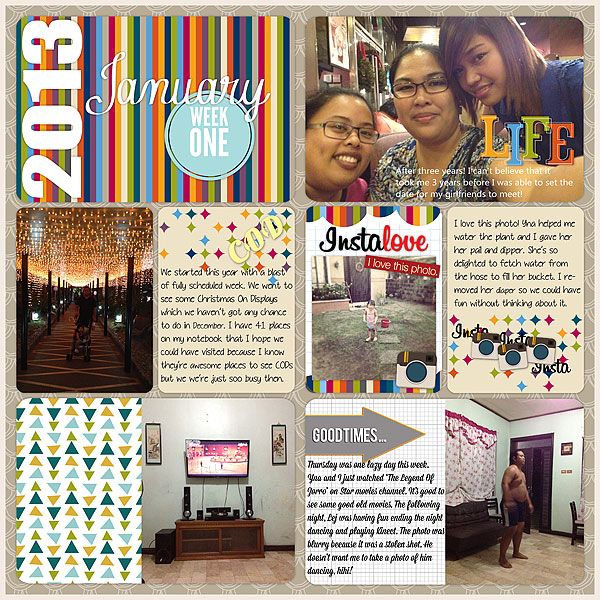
Project Life 365 Week 1

I'm late at posting my PL365 but here's my week 1. Whew! I survived week 1 *grin*


Happy scrapping!!

ALL TEXT AND IMAGES ON THIS BLOG ARE PROPERTY OF MY LIFE ON SCRAPBOOKS UNLESS OTHERWISE STATED. DISCLAIMER: AS A MEMBER OF THE FOLLOWING CREATIVE TEAMS, I RECEIVE PRODUCTS FOR FREE IN RETURN FOR CREATING AND POSTING PROJECTS TO PROMOTE THEIR PRODUCTS. THANKS. Header and Siggy created using Showing Thanks by Blue Heart Scraps
Protected by Copyscape Online Plagiarism Detection