Showing posts with label digital scrapbooking. Show all posts

Sunday, January 22, 2017

Weekly Layout Share | Week 3 and Some News

Happy Sunday everyone! I have a news for you. I've been chosen as one of Dandelion Dust Designs's Feb-April Guest CT!!!! I am so excited to announce you of this good news!!! :) Also, I am chosen as April Guest Store CT at Gingerscraps!! Woohooo! I am just so excited for these news :)


Don't forget to like her Facebook page because she regularly shares some freebies *wink* *wink* And also she has TONS of goodies in her store that I know you will like so much! They're themed and they're flexible for any layout you might need to make! And hey, hey, hey!! We are still in need of September-October guest CT of if you have the time, we would love it if you join us! Click the ad.


And here are some of the layouts I made this week.


Using Positive Vibes by Paislee Press


I'm sick this week due to the weather. I'm hoping to get well soon because I have lots of kits to take care of. Sigh... But as always, happy scrapping everyone!


 photo dec2014siggy_zpsf33d567c.png

Friday, November 6, 2015

Sneak Peak from Amanda Yi (DSD)

Hi everyone! I have a few  sneak peaks for Amanda with some collaborations from other designers for this up coming Digital Scrapbook Day!!!!


This is a HUGE collaboration between Amanda Yi, Studio Basic Designs and Two Tiny Turtles.
You'll sure gonna love this one with lots of possibilities in one kit!!

Here's my layout.


Another kit from Amanda Yi and Meghan Mullens.

Here's my layout:


And another one, again from Amanda Yi, this one is solo.
Great way to scrap your little one's arts and craft.

And here's my layout:


And last one:


Here's my page:


So many goodies, right? With the up coming DSD, be sure to check out SweetShoppe for a lot of fun challenges and sale, sale, sale!!! Happy Scrapping!!!


 photo dec2014siggy_zpsf33d567c.png

Monday, January 5, 2015

SSD January Bingo Challenge

While being busy finishing my daughter's 4th photobook, I'm also joining Sweet Shoppe Designs' January 2015 Bingo Challenge over at the forum. Here's a look at what you're going to do:


I haven't played bingo in my whole existence but I think this one is fun! Head over to Sweet Shoppe Designs' forum to join. Here's my first layout:


Happy scrapping!!! :)

 photo dec2014siggy_zpsf33d567c.png

Wednesday, December 10, 2014

5th Photobook

Hey there! It's been a while huh. How's it going?

I'm in the process of completing another one of my daughter's photobook. And I am really behind. The June 2014 book should have been printed by now and I was supposed to be doing the 6th photobook but unfortunately, I'm doing both. Yeah, I'm really sad about that, but no matter what, I'd like to share a couple of pages today.

This would be the front and back covers of the 5th photobook I'm doing. I used a fiddle dee-dee designs template. The kit I used is from Just So Scrappy and the alpha I used for the word happyness is from a kit I used to ct'd before (let me edit this once I got the right name for you). I just loved that alpha so much.


I also love Kristine Aagard kits. They're just too playful and gummy and they fit for kids layout like this one.


I just want to share to you this layout. I really really loved the outcome of this one. I used a template from Cyndi Schneider and the kit was from Just So Scrappy. See how it looked so summer-y? Yeah I loved this one :)


As years go by, I learn a couple of techniques on how to do a layout. I had my fair share of favorite designers, favorite shadows to use on each elements and papers. I learned a lot from my mistakes from the previous years of making photobooks. And I know that on my next post about my 6th photobook, I'm gonna tell the same thing over because it's constantly happening so long as you continue to sharpen your knowledge through trial and error, reading blogs, checking out galleries and admiring other people's layouts. So have fun everyone and I hope to share with you soon some of my other layouts :)


Tuesday, January 22, 2013

Project Life 365 And Some Great Tips I've Collected From The Web

How is every body doing so far with their Project Life or Project 52/365? So far I'm in my fourth week now. I took these photos using my iphone. Yeah I know, I'm so lazy picking up my camera. I blame it on my computer. I'm still not used to my desktop. And I still have this weird feeling about my ehd. I think it might fail me again :( Well anyway, my iphone is very handy after all. And I can camouflage and pretend that I'm not taking photos of my kid, strangers, food at the diners etc. Tee hee!!

As I surfed the world wide web, I found a lot of tips and tricks on how to complete your Project with pride and less stress. I trimmed them down into 5 points. This might work for you.

1. There will be days when you might NOT have photos taken. Yep, that's the reality. You can use an alternative. Like journaling with no photos at all. Those that are used to their camera like me with get tired (too) of bringing their heavy equipment with them, use your phone.

2. You might skip some months, continue when you're ready. Yep, I've ready (I think) 4 blogs whose authors had this kind of skip problem. They say that it mostly happen when you're just starting. That might really happen to me and I have to ready myself :)

3. If one page is not enough, use a second page or a third page. Hey I love to tell a lot of stories that my daughter would want to hear or read someday about how we conquer this day.

4. Search the web for freebies. One blog author says that you don't need to buy all the Becky Higgins stuff, you can find free stuff just search on the internet and choose what's going to fit on your page.

5. You can use a support group. Include your family in the process of your project so they know what you are doing and they can even help remind you to take photos or finish your page :) This is my favorite part :) There's also an advice about joining a group of people doing the Project. I joined Project Life Support group on Facebook and I regularly read the Project Life 365 on Facebook too.

And I also use a couple of applications on my phone. I find them very useful.

1. Awesome Note (iphone app - free)
It's an all in one organizer from your to-do list to shopping and event checklist, calendar and daily journal. What I like about this one is that it is the same with my journal except that this one's on my phone :)

2. Evernote (iphone app - free)
I have this on my laptop, I have this on my desktop and I now have it on my phone. You can open this anywhere and anytime. Great for copy+paste of your documents, journaling, layouts from your desktop or laptop.

3. Collect: Photo A Day (iphone app - free)
There's a paid version of this called Day 1. I'm so tempted to buy it but I think this one is useful as the other one. It's an application for those collecting photos a day. You click on the date, add a photo, your caption or title and the detailed notes or journaling. You can also tag your photos.

4. QR Reader (iphone app - free)
There are TONS of QR reader in the application store for free. You just have to find what's right for you. What's this for? An additional instrument to rock your Project pages girls! You've seen a lot of pages with text messages scanned and added to their pages, why not include a video of your kids or husband, that's memorable you want them to check someday. Thanks to the genius minds!! :) I've included a QR Code on one of my page, it's the 'concert' of my 2 1/2 year old daughter. And I love how it looks.

I hope you learned something on this post. Happy scrapping with your Project!!

Friday, October 19, 2012

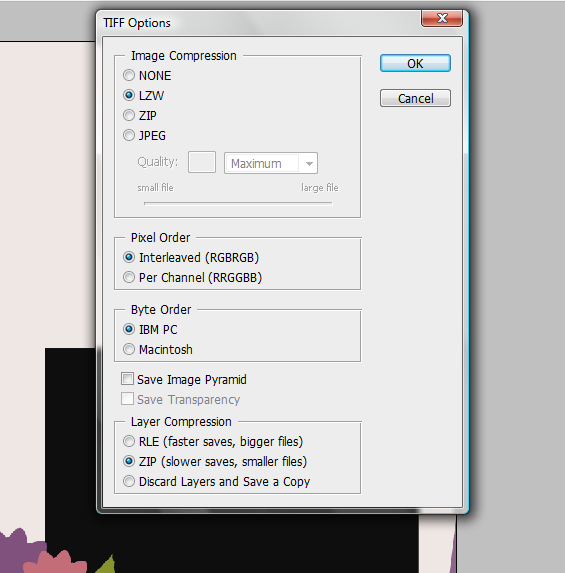
Saving A PSD File in TIFF Format

I have a tutorial for today about saving a TIFF file. When I was just beginning to make my own templates, I used to save TIFF files larger than the PSD file's size. Then I read something about what a TIFF format is online. Where it says that other people are saving this kind of format for a smaller size. It can be that other scrappers prefer this type of file to save space on their computer. It's very easy to memorize actually. And in this tutorial I used Photoshop CS3. Once you opened your PSD file, click on the file menu and choose save as. Then on the pop up window choose on the scroll down menu - TIFF.  Once the TIFF option pop up window opens, just click on the following buttons so they will highlight, and then click OK. This option will automatically save the choices you clicked for the next time you will want to save another file on TIFF format.


Here's a sample of the size of the template I made in TIFF format.


See? It's just 823 kb in 300 ppi 12x12. Pretty cool huh? So go ahead and try it yourself. Happy scrapping!!

Tuesday, March 15, 2011

Hello World!

So Basically this is my very first post on this blog. I have just finished customizing it,  and I wish to post my creations here particularly my scrapbook LOs (paper and digital).

I’d like to dedicate this blog to my scrapping. I had a blog a couple of years ago about scrapping, but unfortunately, email account was hacked, so basically, I can no longer access my blog then. It’s just a shame, i have posted a lot of LOs in there. Well, have to move on and start anew!

Since I cannot 'paper scrap' at this time because I have to take care of my precious little one, I tried digital scrapbooking. It’s fun but very different from paper scrap. I hope to make something out of it especially to enjoy it. I was also familiarizing myself in using my Adobe Photoshop CS5. Yes, it was only now that I used it. I was used to Photoscape and GIMP when editing. But right now, I’d love to use CS5 since GIMP and photoscape lacks features which are essential in digital scrapbooking.
ALL TEXT AND IMAGES ON THIS BLOG ARE PROPERTY OF MY LIFE ON SCRAPBOOKS UNLESS OTHERWISE STATED. DISCLAIMER: AS A MEMBER OF THE FOLLOWING CREATIVE TEAMS, I RECEIVE PRODUCTS FOR FREE IN RETURN FOR CREATING AND POSTING PROJECTS TO PROMOTE THEIR PRODUCTS. THANKS. Header and Siggy created using Showing Thanks by Blue Heart Scraps
Protected by Copyscape Online Plagiarism Detection